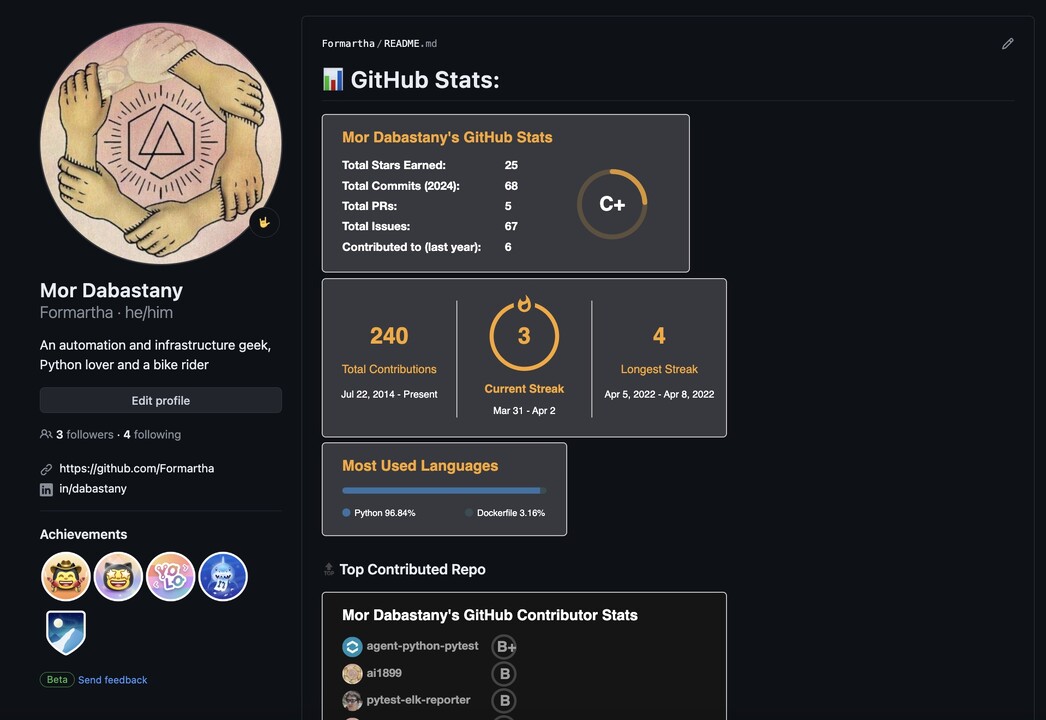

Your GitHub profile is your virtual resume, showcasing your coding skills, projects, and contributions to the open-source community. By optimizing your profile, you can attract potential employers, collaborators, and peers, ultimately advancing your career in the tech industry.
Here’s how you can enhance your GitHub profile to leave a lasting impression.
Complete your profile information
Provide a comprehensive overview of your skills, experiences, and interests. A well-written bio and a professional profile picture make a significant difference in how others perceive you. Add your location, website, and social media links to increase visibility and connectivity.
Showcase your pinned repositories
GitHub allows you to pin up to six repositories on your profile, ensuring that your best work is prominently displayed. Choose repositories that demonstrate your expertise, creativity, and problem-solving abilities. README files with clear descriptions, screenshots, and usage instructions make your projects more accessible and engaging.
Contribute to open-source projects
Contributing to open-source projects is an excellent way to gain experience, collaborate with others, and showcase your coding skills. Look for projects related to your interests or technologies you want to learn, and start by fixing bugs, adding features, or improving documentation.
Create and maintain a portfolio
Consider creating a dedicated portfolio repository to showcase your best work. This repository can include sample projects, coding challenges, and personal experiments. Regularly updating and maintaining this repository demonstrates your commitment to continuous learning and growth.
Utilize GitHub’s features
Explore and leverage GitHub’s features such as README files, wikis, issues, and project boards. These tools help you organize and document your projects, track progress, and collaborate more effectively with others.
Engage with the community
Participate in discussions, answer questions, and provide feedback on other projects. This engagement not only helps you learn from others but also establishes your presence as a knowledgeable and supportive member of the developer community.
Benefits and impact
By doing what’s suggested, you’ll get:
- Increased visibility and credibility within the developer community.
- Opportunities for collaboration and networking with like-minded individuals.
- Demonstration of your coding skills, problem-solving abilities, and commitment to continuous learning.
- Attraction of potential employers or freelance clients who value your expertise and contributions.
- Facilitation of knowledge-sharing and mentorship opportunities.
- Contribution to open-source projects, fostering a spirit of collaboration and community.
How to outshine with a personal GitHub profile
The simplest way to stand out is to create a profile README and place it in your own repo. An example can be found at my own profile: Formartha (Mor Dabastany).
Steps:
- Create a new repo with your username as the repo name (this is the special “profile repo” that GitHub renders on your profile page).
- Go to GPRM - GitHub Profile ReadMe Maker and generate your profile.
- Copy and paste the generated README into your repo.
- Commit it. Voilà.
Remember, your GitHub profile is a living representation of your coding journey. By consistently updating and refining it, you can showcase your growth, highlight your achievements, and open doors to exciting opportunities in the tech industry.